Migrating Server 2008 R2 Domain Controllers to Server 2012

On the 1st of August Microsoft officially announced that their latest client and Server Operating Systems Windows 8 and Server 2012 have now hit RTM (Release to Manufacturing) With the final bits then being handed to OEM’s on the 2nd.

In relation to this, I figured it would be good idea to cook up a guide showing the process involved to migrate from existing Server 2008 R2 domain controllers within your Active Directory environment to new Server 2012 installations. Thankfully the process for carrying this out remains almost identical as with previous versions of Windows Server.

Prerequisites:

  • Actively serving Windows Server 2008 R2 Domain Controllers
  • Server 2003 Forest functional level or higher (minimum)
  • An aditonal server or Virtual Machine running Windows Server 2012
  • A user account with domain administrative privillages
  • A user account that is a member of the Schema Admins group


Stage 1: Prepare the Active Directory Forest

The first step on this procedure is to insert your Windows Server 2012 DVD into the 2008 R2 domain controller which holds the Schema Master role (This is normally the primary domain controller within your environment)

The next thing we need to do is prepare the Active Directory forest with the latest schema extensions. To do this first make sure that you are logged onto the domain controller holding the Schema Master role and that the account being used is a member of the Schema Admins group.

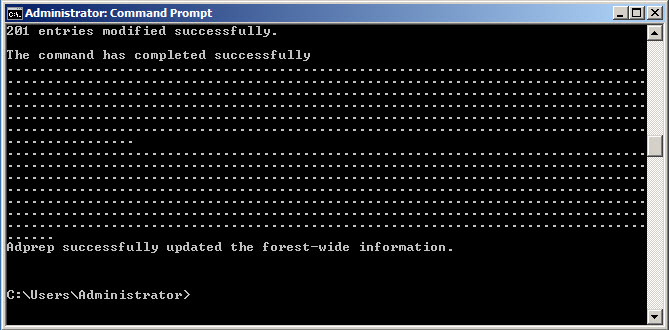
Open an elevated Command Prompt window and type the following command:

X:\support\adprep\adprep /forestprep (Where X: is the letter of your DVD drive)

Type C followed by Enter to begin the process.

The forest has now been updated with the latest Schema extensions.


Stage 2: Promote a new server or Virtual Machine with Server 2012 as an additional domain controller.

Now that the forest has been successfully prepared, we will now proceed with promoting our new Server 2012 instance as an additional domain controller.

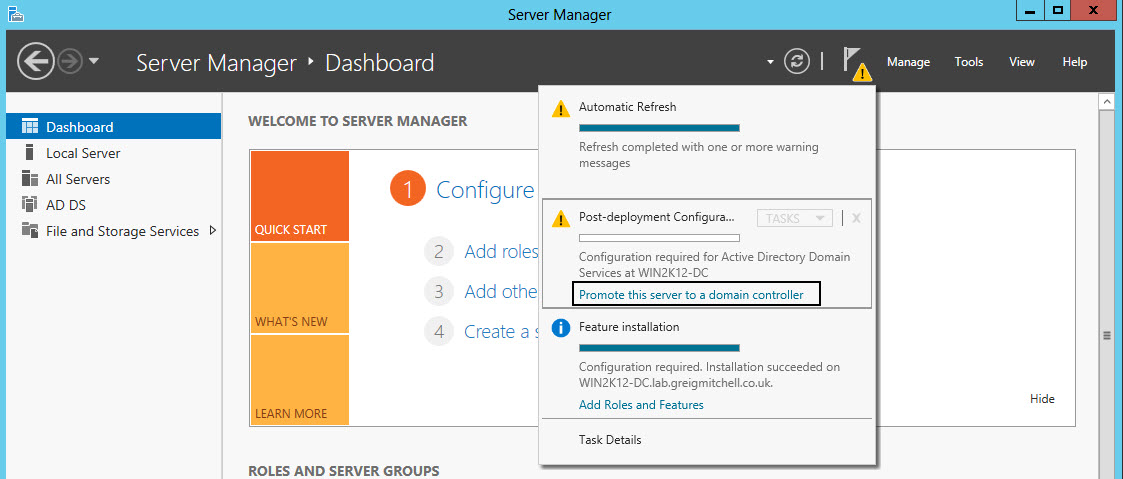
Unlike previous versions of Windows Server the use of the dcpromo command has been dropped from Server 2012. To promote a 2012 server you must use the wizard provided by Server Manager.

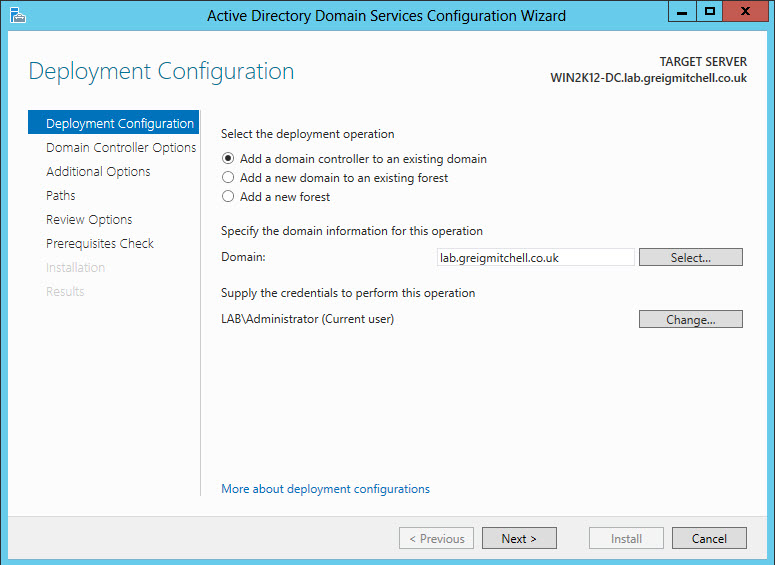
To do this click on the notifications icon and select the option to promote the server to a domain controller under Post-deployment configuration.

Continue with the rest of the wizard to promote the server, and checking both DNS and Global Catalog options. Since the process itself is pretty much straightforward I won’t include screenshots for every step involved here.

Once completed verify that the new domain controller has been successfully adding by checking various elements within Active Directory. E.g. Sites and Services or Users and Computers.


Stage 3: Transfer the FSMO roles to the new domain controller

The third and final stage is to move all of the existing four FSMO roles (Flexible Single Master Operation) to the newly promoted domain controller. These include; Schema Operations Master, RID Master, PDC Emulator and Infrastructure Master roles.

1. Transfering the Schema Operations Master

In order to carry out this task you must install the Active Directory Schema Snap-In on the FSMO role holder. Windows Server 2008 and higher require this DLL to be registered. To do this simply enter the following command from a Command Prompt window:

regsvr32 schmmgmt.dll

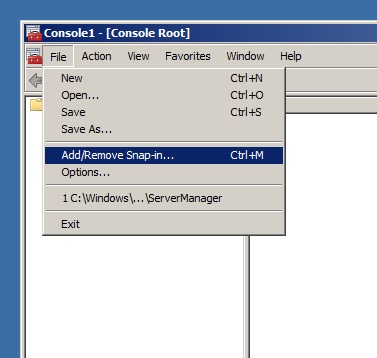
After adding the Snap-In we can now connect to the Schema by opening a new windows management console. Go to Start > Run and type “mmc” (without the quotes) to bring one up.

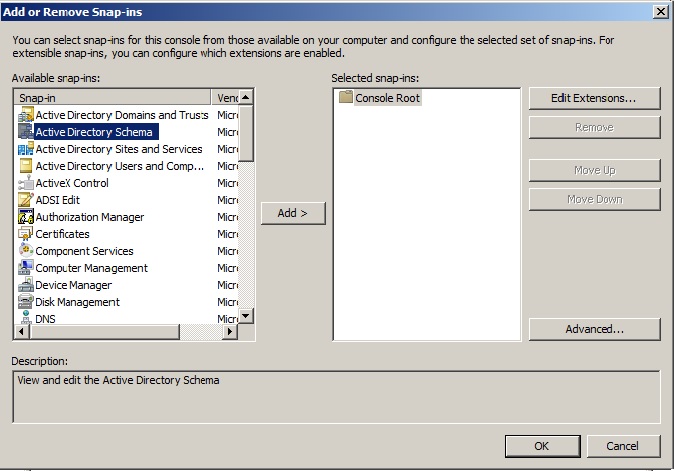
Select File > Add/Remove Snap-In and add the Active Directory Schema:

Verify connectivity with the Schema Operations Master by right clicking on the Schema and selecting “Connect to Schema Operations Master”

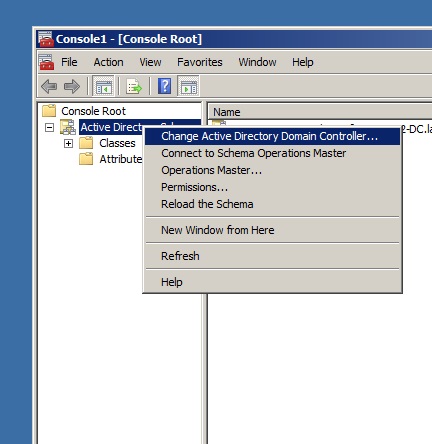
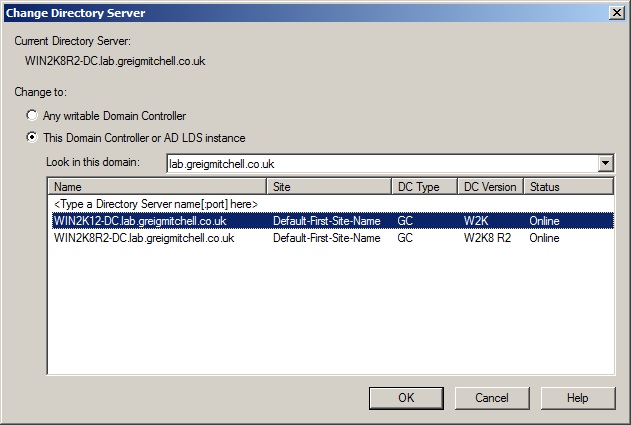
Change the Domain Controller to the new 2012 server by right clicking and selecting “Change Active Directory Domain Controller”

Note: After changing domain controller you may then be presented with a message stating that you are not connected to the Schema Operations Master:

This is only because you have selected a domain controller which does not  hold the specified role. This role will now be moved to the new Server 2012 domain controller.

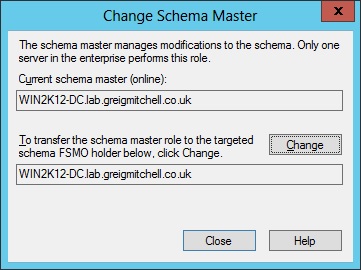
Right click and select Operations Master”

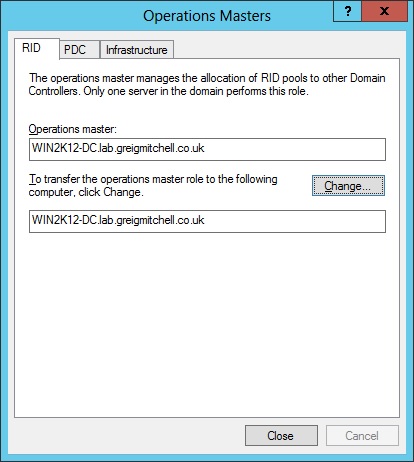
Select the Change button to transfer the role to the Server 2012 domain controller:


2. Transferring RID, PDC and Infrastructure Operation Masters

To transfer the remaining roles to the new Server 2012 domain controller open Active Directory Users and Computers by going to Start > Administrative Tools > Active Directory Users and Computers.

As with the Schema Master, right click and change the domain controller to the new 2012 server.

For each Operations Masters select Change on each to transfer them:


Finally, verify that all Operations Masters have been transferred to the new domain controller:


If all has went smoothy you should now have a fully functional Server 2012 domain controller running within your environment. However, from here there are still some post-migration steps that you should be performed once everything has been verified as functioning correctly.

If you are performing such a migration in a production environment with multiple domain controllers then always remember to promote an additional server as a Server 2012 domain controller, especially after transferring the FSMO roles to another.

This will then allow you to demote any older domain controllers that are no longer required, giving you the ability to then raise the Domain and Forest Functional levels.

Posted in Computers and Internet, Techie Hobbies | Leave a comment

Ensuring High Availability of DHCP using Windows Server 2012 DHCP Failover

Ensuring High Availability of DHCP using Windows Server 2012 DHCP Failover

Introduction

Ensuring high availability of critical network services like DHCP figures high in the list of priorities for any enterprise. In an environment where clients get their IP addresses and network configuration automatically, uninterrupted network connectivity is dependent on the availability of DHCP service at all times. Let us consider for a moment what high availability of DHCP server is intended for:

–         Any authorized computer which connects to the network should be able to obtain its IP address and network configuration from the enterprise DHCP service at all times.

–         After obtaining an IP address, a computer shouldbe able to renew its lease and continue using the same IP address so that there is no glitch in connectivity.

Windows Server 2012 DHCP provides a new high availability mechanism addressing these critical aspects. Two DHCP servers can be set up to provide a highly available DHCP service by entering into a failover relationship. A failover relationship has a couple of parameters which govern the behavior of the DHCP servers as they orchestrate the failover. One of them is the mode of the failover operation – I will describe this shortly. The other is the set of scopes that are part of the failover relation. These scopes are set up identically between the two servers when failover is configured. Once set up in this fashion, the DHCP servers replicate the IP address leases and associated client information between them and thereby have up-to-date information of all the clients on the network.  So even when one of the servers goes down – either in a planned or in an unplanned manner – the other DHCP server has the required IP address lease data to continue serving the clients.

Modes of Failover Operation

There are two modes of configuring DHCP failover to cater to the various deployment topologies:  Load Balance and Hot Standby. The Load Balance mode is essentially an Active-Active configuration wherein both DHCP servers serve client requests with a configured load distribution percentage. We will look at how the DHCP servers distribute client load in a later post.

The Hot Standby mode results in an Active-Passive configuration. You will be required to designate one of the two DHCP servers as the active server and the other as standby. The standby server is dormant with regard to serving client requests as long as the active server is up. However, the standby server receives all the inbound lease updates from the active DHCP server and keeps its database up to date.

The DHCP servers in a failover relationship can be in different subnets and can even be in different geographical sites.

Deployment Topologies

The support of these two modes enables a wide range of deployment topologies. The most rudimentary one is where two servers in a Load Balance or Hot Standby mode serve a set of subnets which are in the same site.

A slightly more involved deployment where failover is being deployed across two different sites is illustrated in Figure 1. Here, the Hyderabad and the Redmond  site each have a local DHCP server servicing clients in that site. To ensure high availability of the DHCP service at both the sites, one can setup two failover relationships in Hot Standby mode. One of the failover relationships will comprise all subnets/scopes at Hyderabad. It will have the local DHCP server as the active server with the DHCP server at Redmond as the standby. The second failover relationship will comprise all subnets/scopes at Redmond. It will have the local DHCP server as the active server and the DHCP server at Hyderabad as the standby.

Figure 1: DHCP Failover Deployed Across Two Sites

This deployment construct of two DHCP servers backing up each other for two different set of scopes via two failover relationships is extensible to more than two sites. One can visualize a ring topology involving multiple sites where a server at each site – in addition to being the active server for the local network – is the standby server for another site. The failover relationships can be set up to form a ring topology through the DHCP servers at different sites.

Hub-and-Spoke is another multi-site deployment topology which lends itself quite well to how organizations are looking to deploy failover. Here, a central DHCP server acts as the standby for multiple active DHCP servers each of which serves a different branch office.

Better than earlier HA mechanisms

Windows DHCP server has so far met the HA requirement by enabling hosting of the DHCP server on a Windows Failover Cluster or by split scope deployments. These mechanisms have their own disadvantages. The split scope mechanism relies on configuring identical scopes on two DHCP servers and setting up the exclusion ranges in such a fashion that 80% of a subnet’s IP range is used for leasing out IP addresses by one of the servers (primary) and remaining 20% by the other server (secondary). The secondary server is often configured to respond to clients with a slightly delayed response so that clients use IP addresses from the primary server whenever it is available. Split scope deployments suffer from two problems. IPv4 subnets often run at utilization rates above 80%. In such subnets, split scope deployment is not effective given the low free pool of IP addresses available. The other issue with split scope is the lack of IP address continuity for clients in case of an outage of the primary server. Since the IP address given out by the primary DHCP server would be in the exclusion range of the secondary server, the client will not be able to renew the lease on the current IP address and will need to obtain a new IP address lease from the secondary server. In the case of split scope, the two DHCP servers are oblivious to each other’s presence and do not synchronize the IP address lease information.

To host the DHCP server on a Windows Failover Cluster, the DHCP database needs to be hosted on a shared storage accessible to both nodes of a cluster in addition to the deployment of the cluster itself. DHCP servers running on each node of the cluster operate on the same DHCP database hosted on the shared storage. In order to avoid the shared storage being the single point of failure, a storage redundancy solution needs to be deployed. This increases the complexity as well as the TCO of the DHCP high availability deployment.

The Windows Server 2012 DHCP failover mechanism eliminates these shortcomings and provides a vastly simplified deployment experience. Moreover, DHCP failover is supported in all editions (Foundation, Standard, Enterprise, Data Center) of Windows Server 2012.  As one of the server reviewers aptly put it, this is high availability of DHCP on a low budget!

Management interfaces

DHCP failover can be configured using the DHCP MMC as well as the DHCP PowerShell cmdlets. Everything you can do via the MMC for DHCP failover is achievable via the DHCP PowerShell cmdlets as well. The DHCP MMC provides a Failover Setup wizard which greatly eases the setup of failover. There are two launch points in the DHCP MMC from which a user can start the wizard. The right click menu options on the IPv4 node now have a Configure failover… option. If launched from here, all the scopes on the server which are not yet setup for failover are selected for failover configuration. Alternatively, if you select one or more scopes and right click, you will see the same Configure Failover… option. If launched in this fashion, only the selected scopes are configured for failover. Please see the step by step guide to setup failover using DHCP MMC. You can download the “Understanding and Troubleshooting guide” here.

For the command line users, DHCP PowerShell provides the following PowerShell cmdlets for setting up and monitoring failover:

  • Add–DhcpServerv4Failover  – Creates a new IPv4 failover relationship to a DHCP server
  • Add–DhcpServerv4FailoverScope   – Adds the specified scope(s) to an existing failover relationship
  • Get–DhcpServerv4Failover   – Gets the failover relationships configured on the server
  • Remove–DhcpServerv4Failover   – Deletes the specified failover relationship(s)
  • Remove–DhcpServerv4FailoverScope – Removes the specified scopes from the failover relationship
  • Set–DhcpServerv4Failover   – Modifies the properties of an existing failover relationship
  • Invoke-DhcpServerv4FailoverReplication – Replicates scope configuration between failover partner servers

In addition to these, Get–DhcpServerv4ScopeStatistics cmdlet which returns scope statistics has a “-failover” switch. Specifying this switch causes the cmdlet to return failover specific statistics for scopes which are configured for failover.

In conclusion, DHCP failover in Windows Server 2012 provides a high availability mechanism for DHCP which is very easy to deploy and manage and caters to the critical requirements of continuous availability of DHCP service and IP address continuity for the clients. Early adopters of the feature have shared our enthusiasm for this critical DHCP functionality and feedback from them has been very positive.

Give it a spin on Windows Server 2012 Release Candidate and we hope that you will find it useful!


Team DHCP

Posted in Techie Hobbies | Leave a comment

How the Cloud is Making Siri Smarter in iOS 6

How the Cloud is Making Siri Smarter in iOS 6

Overview

Apple’s Siri on the iPhone 4s has been both revered and reviled since its release last year. Based on Apple’s uncanny ability to create such love/hate relationships, this comes as no surprise. At the root of why Siri evokes these emotions are her potential and her performance. Luckily, it is possible to realize potential and improve performance. So how will Apple do this for Siri in the upcoming iOS 6 release? They will leverage the technology that is both Siri’s heart and her soul — the Cloud.


How Siri Works

A wise person once said that to understand where we are going, we must understand where we have been. Let’s take a few moments to understand a little about Siri and the path she has traveled until now.

Siri is not a speech recognition app, but instead a natural language processing technology that focuses more on what you meant than on what she thinks you said. For example, if asked “is there a bathroom on the right?” with a heavy accent, simple speech recognition may hear “Is there a bad moon on the rise?” which would only be helpful when looking for the lyrics to a classic Creedence Clearwater Revival song. Natural language processing on the other hand will realize what you meant and allow the system to answer you correctly, which you will most assuredly appreciate. Natural language processing also empowers Siri to have a conversation, not just respond to simple commands.

Get X-ray vision into your HyperV hosts with the FREE, easy-to-use VM Monitor!

Siri utilizing cloud computing
When an iPhone 4s user asks Siri a question, it, along with other information from the device, transmits to the cloud for processing. The Cloud sends a response back to the device, Siri informs the user, and the conversation either ends or the process repeats when the user responds. The important thing to note here is that the Cloud, not the iPhone 4s, is doing all of Siri’s heavy lifting. Siri’s Cloud is comprised of ever growing privately owned Apple Datacenters with massive bandwidth pipelines.

How Siri’s Getting Smarter

Unfortunately, Siri’s current iteration in iOS 5 has been limited, relatively speaking, in the phrases she properly interprets. Of course, in Apple’s defense, they openly list Siri as a beta product. The goal of a beta program is to test, analyze, and improve. Nothing improves natural language processing better than data. Data on what the system hears versus what the user meant. Data on the most common questions asked or the phrases spoken. Data, data, data! This is where the Cloud gives Siri a powerful advantage through its distributed computing model.

People ask Siri millions of queries every day. Once transferred to the Cloud these are not only processed, but also stored. By aggregating this staggering amount of data, Apple has been able to learn in months what would have previously taken years. This analysis gives insight into what, where, when, how, and why users are talking to Siri. Understanding these answers has opened new doors for her in iOS 6. Siri will answer more questions with more accuracy about more subjects and in more places. No single device, let alone a mobile one, could provide this mammoth intelligence and statistical analysis. Only the Cloud’s distributed computing model and cumulative storage is suited to this task.

Cloud’s Impact on Siri

The cloud, by its nature, separates the back-end computing horsepower from the end user device. This has been an amazing factor in Siri’s evolution. Apple is upgrading, expanding, and even replacing back-end infrastructure such as servers, network components, and storage without any user even knowing, let alone being involved. Siri has grown, and grown, and grown, yet still runs on the same iPhone 4s as she launched on. In fact, with the release of iOS 6, Siri will run on the latest generation iPad. This is a refreshing development in an era where product evolution has required users to buy new devices. Only by leveraging the Cloud’s disconnected back-end has Apple pulled this off for Siri’s next generation.

The Cloud intertwines network with network, system with system. Interconnectivity on this scale enables significant features in the iOS 6 version of Siri:

  • Sports scores and schedules in real time.
  • Restaurant reviews, reservations, and wait times.
  • Movie theaters, film information, and show times.

Siri in iOS6

All these capabilities come to Siri in iOS 6. An individual iPhone 4s could not connect to all the systems necessary to perform the above with anywhere near the performance the Cloud provides. Besides performance, for those with limited data plans, think of the savings with the Cloud doing the processing. The Cloud maintains the constant data flow necessary to have all the information at the ready. The user data plan only transfers the required answer when asked.

So while Apple’s Datacenters use bandwidth to know the score of your favorite baseball game every minute of every inning, your iPhone only uses your data plan to retrieve the score at the bottom of the seventh when you asked. At a time when all iPhone 4s carriers are working to eliminate unlimited data plans, the Cloud powers Siri with a punch she otherwise may not have had.

Summary

Siri’s use of the Cloud elicits both praise and condemnation. Regardless, without Siri’s Cloud based model, Apple would never have been able to create the next generation product that will arrive in iOS 6. The Cloud’s distributed processing model, separation of back-end processing from the user device, and interconnections, combined with its many other unique features provided Apple the insight, intelligence, and power to produce a Siri that performs considerably better than her predecessor. The iOS 6 version of Siri is not perfect, but it is assuredly a significant step towards realizing Siri’s sizable potential.

Posted in Techie Hobbies | Tagged , | Leave a comment

Test-ExchangeServerHealth – PowerShell Script to Generate a Health Check Report for Exchange Server 2010

Test-ExchangeServerHealth – PowerShell Script to Generate a Health Check Report for Exchange Server 2010

by Paul Cunningham

A few months ago I released an Exchange 2010 mailbox server health check script.

While the script was useful it lacked a few important things. For one thing, it only checked the mailbox server role. Also, the results were only output to the shell session, not in object form, so there wasn’t much that could be done with the results.

Today I’m release a totally overhauled and updated version of the script that addresses those problems.

Download the script file here: Test-ExchangeServerHealth.ps1 (downloaded 1 times so far)

The Test-ExchangeServerHealth.ps1 script is run from the Exchange Management Shell. You can use a few builtin parameters to control what it does.

.PARAMETER server
Perform a health check of a single server

.PARAMETER reportmode
Set to $true to generate a HTML report. A default file name is used if none is specified.

.PARAMETER reportfile
Allows you to specify a different HTML report file name than the default. Implies -reportmode:$true

.PARAMETER sendemail
Sends the HTML report via email using the SMTP configuration within the script. Implies -reportmode:$true

If you use the report mode you’ll get a HTML file containing the health check results, and/or an email to your designated address if you also use the send email option.

For the email functionality to work please update these variables in the script to suit your environment.

#...................................
# Email Settings
#...................................

$smtpServer = "ho-ex2010-mb1.exchangeserverpro.net"
$smtpTo = "administrator@exchangeserverpro.net"
$smtpFrom = "healthcheck@exchangeserverpro.net"
$messagesubject = "Exchange Server Health Check - $date"

Here is a demo video explaining how the different options work.

Popout

Download the script file here: Test-ExchangeServerHealth.ps1 (downloaded 1 times so far)

Edit:

http://exchangeserverpro.com/test-exchangeserverhealth-ps1-v1-2-released/


Please feel free to download and try the script. If you encounter any bugs or have any feedback please leave a comment below.

If you’re looking for an example of how to schedule the script to run using Task Scheduler please see this article.

Posted in Computers and Internet, Techie Hobbies | 2 Comments

The Best Wireless-N Routers for Installing & Running DD-WRT Open-Source Firmware (2012 Updated)

The Best Wireless-N Routers for Installing & Running DD-WRT Open-Source Firmware (2012 Updated)

Since our previous post about the best and most popular DD-WRT routers is far and away the most visited in our site’s history with readers, we figured it was time to provide visitors with an updated list.

Technology moves fast, lightning fast. Gadget life cycles that previously lasted a few years, shifted to a year, and now new versions of mobile devices and operating systems are released every few months, if not more often. To keep up with proper security measures and techniques as well as the desires and demands of connected users today, a wireless router with firmware that keeps up with the times and can be consistently upgraded like a DD-WRT router is a must!

What to look for when purchasing a DD-WRT Router?

Before choosing a router as the backbone of your network, it is imperative to map out the specific options you need and plan how to utilize and implement them within your network configuration. Ask yourself , “Is there a specific setting that I know is available but is missing on my current router?” Think about it and then ponder the additional benefits and advantages to be acquired from running DD-WRT.

  • Do you need Virtual Private Network (VPN) client integration (PPTP, OpenVPN, L2TP) to provide secure connections for all your devices and users?
  • Are you looking for advanced NAT controls for preventing lag and delays with online console gaming like XBOX Live?
  • Do you need simultaneous dual band transmissions?
  • Would you like Universal Plug and Play (UnPnP) and networked USB printer/backup storage support?
  • Need to setup a Guest Network or WiFi Hotspot for your home or office?

Default router firmware often hinders a person’s ability to have many of these options at your disposal. Replacing a router’s lackluster firmware with DD-WRT creates an upgraded, open source solution which make these previously impossible tasks as simple as a few clicks.

The DD-WRT platform supercharges a router with a wide breadth of abilities, turning the average a $100 router into a $500-plus router. Just a few improvements from DD-WRT installation include: advanced QoS (Quality of Service) bandwidth controls for specifying spectrum and speed for specific network devices, settings for boosting a router’s antenna strength, WiFi hotspot integration & a Wireless Repeater Mode to extend wireless range into wireless deadspots in a home or office.

Dissecting router specifications and quality can quickly become an endless, frustrating task; so here is a handy, time-saving list of the DD-WRT recommended router choices to meet dissenting tastes and differing pricing and feature needs. That’s where FlashRouters comes to the rescue!

When purchasing a DD-WRT from FlashRouters, we offer network specialists who can assist you in making sure your DD-WRT network can get up and running the way you desire. Ready to find the right DD-WRT router for you? Read on!

The Best All Around DD-WRT Router
Linksys Cisco E4200 DD-WRT

Top Choice - Best All-Around DD-WRT Router Under $200

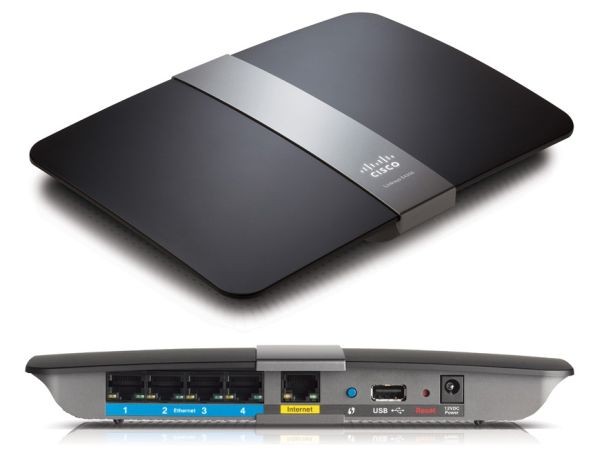
The E4200 is a DD-WRT router that users have craved. Stylish, lightweight, and designed to fit fashionably into a home as the latest networking accessory. Providing high end antenna & processing power, alongside the bells and whistles that a wireless networking experts have long preferred.

E4200 DD-WRT Router Performance

The E4200 running DD-WRT has undergone extensive and continual DD-WRT version flashing tests, scouring for the most all-encompassing version for its Broadcom chip; testing its stability and durability for long term and heavy use for power users. Converting the firmware from Lnksys Cisco’s subpar firmware to DD-WRT Mega build allows the E4200 to flourish and become the perfect network solution for the most memory intensive networking setups and operations.

The E4200 DD-WRT Router handles all the tasks you may need in stride from high-end streaming video to screaming download speeds to a high volume of connections with guest networks and P2P torrents while also providing consistently the strongest VPN connections. The E4200 works perfectly with most VPN service providers including: Overplay, HideMyAss, StrongVPN, Astrill & PureVPN.

Touted by Cisco as part of their Maximum Performance router series, here’s a quick list of the most highly sought after and desirable features on the Linksys E4200 DD-WRT Router:

  • Maximum Wireless Speed up to 750 Mbps (300 + 450 Mbps).
  • Six Powerful Internal Antennae with full 3×3 MIMO antenna array.
  • Simultaneous Dual-Band N (2.4 & 5 GHz).
  • Gigabit Ethernet 4-port switch.
  • Network USB port for data sharing, media storage backup & networked printing.
  • Unrivaled HD Video Streaming via Youtube, Netflix, Hulu, and more.

Ready to upgrade to a Linksys Cisco E4200 DD-WRT?

Get an E4200 for $199.95! (Psst! Just because you read our blog, use the coupon code “best2012″ through 5/15/2012 and get an extra $10 off any router in this post over $65.)

Best in Class DD-WRT Runners-Up

Netgear WNDR3700 N600 ($149.95) – Offers the full package of top shelf consumer grade router options including Simultaneous Dual-Band, four Gigabit Ethernet ports, Max Wi-Fi speed of 600 Mbps (megabits per second) eight internal antennas for signal-boosting strength and a networked USB port for network printing and system backup capabilities.

Linksys Cisco E3000 ($149.95) – A DD-WRT classic! Linksys Cisco’s one-time best-in-class consumer router is now a speedy, powerful high-end value router, perfect for those who want the benefits of a fast processor, a networked USB port, dual band connectivity but at a lower price point than the E4200.


The Most Popular & Recommended DDWRT Router
Asus RT-N16

Asus RTN16 DD-WRT Router with USB Port & High-Strength 2.4 GHz Signal

For the second year in a row, the Asus RT-N16($134.95) tops the list as the most popular DD-WRT router.

After surveying DD-WRT users, scouring router reviews and message boards, the ASUS RT-N16 emerges as the most highly rated by DD-WRT users for its excellent price, dual USB ports, and huge installed memory.

The Asus RT-N16′s huge 128 MB of RAM with 32 MB of Flash memory is a distinct advantage over more expensive, higher-end routers is its — even the Linksys E4200 and the Netgear WNDR3700 only contains 64 MB RAM with 8 MB Flash. This extra memory gives the RT-N16 space to burn when it comes to installing the mega build of DD-WRT allowing for ample space for buffering your network activity.

A bedrock of consistency, the Asus RT-N16 offers just about everything that a DD-WRT router user would want. The RT-N16’s three potent external antennas compared to the trendy internal antennas provide one of the most consistent signals from strenuous streaming and sharing tasks to everyday Internet surfing use. It is especially popular with users who prefer its high-powered external antennas that can be upgraded to even stronger signal receivers/transmitters.

The variations of firmware that is dedicated to this favorite is astounding and overwhelming but can also lead to confusion and anguish so let FlashRouters use their expertise to pick the best DD-WRT firmware for you.

Ready to get upgrade to an Asus RT-N16.

Up and Coming Best-of-Breed DD-WRT Router

TP-Link TL-WR1043ND ($89.95) – A very popular Atheros chip DD-WRT router which has a similar form factor to the RT-N16 with its white exterior, 3 external antennas. The lower price is due to a smaller memory size and only one USB port but has comparable speed and wireless connectivity. A perfect under $100 Single Band Wireless-N router.


Best Budget DD-WRT Router/Wireless Repeater: Airlink 101 AR670W

VPN Airlink AR670W - Modified with DD-WRT Open Source Firmware

In a surprise upset, the trophy for top budget router in performance goes to the Airlink101 670W DD-WRT Router ($64.95). This overlooked, under-appreciated workhorse paired with DD-WRT firmware allows for seamless transition of a router into alternate, more specified networking tasks.

As is the case with all of our FlashRouters, economy class DD-WRT routers come with built-in VPN passthrough capabilities for those with security concerns looking to filter all their traffic through an encrypted VPN connection. Augmenting a network with a FlashRouter enables you to create a separate gateway just for connecting to a VPN while leaving the main router as the center of your network’s standard non-VPN traffic.

For more information on this and other dual router configurations and options, visit our post on dual router setups.

Best Low-Priced DD-WRT Router Contenders

Linksys E1000 DD-WRT Wireless-N Router/Repeater ($59.95) – A customer favorite as the BEST affordable DD-WRT option as wireless repeater/range extender or dedicated VPN connection router in a dual network setup.

D-Link DIR-601 ($47.95) – Tiny but nimble. A all-time favorite of the DD-WRT community with its extremely low price tag, portability, and reliability. Not available as a wireless repeater.

Posted in Computers and Internet, Techie Hobbies | Tagged | 1 Comment

Cisco Unified Computing System: UCS Manager Simulator Overview

Cisco Unified Computing System: UCS Manager Simulator Overview


Overview

For those looking to gain experience with the Cisco Unified Computing System (UCS) platform without access to a UCS lab, Cisco has developed the UCS Platform Emulator (UCSPE). Because the UCS platform requires a large investment to deploy in a lab, the UCSPE offers a perfect low cost solution. The UCSPE is a packaged VMware virtual machine and offers most of the capabilities of the latest UCS platform; this can be used by candidates looking to gain experience or for experienced engineers looking to test a configuration. This article takes a look at the simulator installation prerequisites, basic setup configuration and UCSPE limitations.

If you’re interested, check out my previous articles on Cisco UCS:

UCSPE Prerequisites

Before UCSPE can be used, the physical system slated to be used for installation must meet some minimum requirements, including:

  • 1 GB of free RAM
  • 8 GB of free HD space
  • At least a 1.8 GHz single-core processor

Along with these physical system requirements, the machine must also have a VMware product installed that will run the UCSPE virtual machine; these products include one of the following:

  • VMware player
  • VMware Workstation (on Windows OS)
  • VMware Fusion (on MAC OS)
  • VMware ESX hypervisor

To run the UCS Manager GUI, the Firefox browser is required, along with an installation of the Java Runtime Environment 1.6 or higher.

Explore what you can build with Windows Azure

UCSPE Setup and Configuration

The UCSPE package that is retrieved from Cisco is typically delivered in the 7zip archive format and is about 300 MB; once uncompressed, the UCSPE virtual machine files are about 1 GB in size. Once uncompressed, a file with the extension .vmx will exist with a filename that reflects the version of UCSPE; click on this file to begin the UCSPE emulator.

The UCSPE will start up and when first run, will completely unpack and install itself; this is shown in Figure 1:

Starting Up UCSPE


Figure 1 – Starting Up UCSPE


Once completely unpacked and installed, UCSPE will take up about 4 GB of HD space and will show a login screen; this is shown in Figure 2:

UCSPE CLI Login


Figure 2 – UCSPE CLI Login


This screen will also show the IP address that will be used to access the UCSPE management web page and is shown in Figure 3:

UCSPE Control Panel


Figure 3 – UCSPE Control Panel


Before going forward and running the UCS Manager, it is a good idea to check out the existing inventory that will be used by the emulator; this configuration can be changed to meet the requirements of the user and the specific environment they are trying to emulate. For those with no specific environment in mind, the emulator comes configured with a full chassis of servers. The configuration process for changing these settings is not very user friendly but can be figured out by anyone with a little bit of effort.

The hardware inventory screen is shown in Figure 4 below:

UCSPE Start-up Inventory


Figure 4 – UCSPE Start-up Inventory


From this page, it is also possible to change other specific emulator configuration settings; the screens for these are shown in Figure 5:

Emulator Settings


Figure 5 – Emulator Settings


As is shown in Figure 5, it is possible to change a number of the emulator settings to meet additional requirements of the environment, including changing whether High Availability is used and what the management IP settings will be used.

Once all the settings have been configured, it is then time to run the UCS Manager on the emulation; this is done at the main screen by clicking the “Launch UCS Manager” button (This is shown in Figure 3 above). Once clicked, Java will be run to start the UCS manager as shown in Figure 6:

Running Java


Figure 6 – Running Java


It is possible during this time to see a number of Java windows, including one that asks for permission to run the UCS manager; Figure 7 shows an example of one of these screens:

Java Signature Check


Figure 7 – Java Signature Check


When prompted with these screens, just select the “Run” button. The UCS Manager will then prompt for a username and password; by default, this is set to config/config. Figure 8 shows the login screen:

UCS Manager Login Screen


Figure 8 – UCS Manager Login Screen


When successfully run, the UCS Manager screen will be displayed and is ready for configuration; the main UCS Manager screen is shown in Figure 9:

UCS Manager Main Screen


Figure 9 – UCS Manager Main Screen


Summary

When trying to learn about many different types of unified systems, it is hard if not impossible to get any real amount of hands-on experience without actually working with a company that has it already installed. The Cisco UCSPE offers these individuals a chance to interact with the product and gain experience on the equipment, without having to work at one of the companies; this experience will greatly add to the ability of a new unified system engineer’s chances of gaining employment.

The UCSPE advantages do not stop there; it is possible for it to be used by more experienced engineers to test potential configurations before trying them on live equipment. This ability can be very useful to ensure all contingencies are accounted for, and that the expected result from the configuration changes are achieved.

Posted in Computers and Internet, Techie Hobbies | Tagged | Leave a comment

VIRTUAL CONNECT FOR VSPHERE AND CISCO NEXUS DOCUMENTS

Virtual Connect for vSphere and Cisco Nexus Documents

 
The BladeSystem team in HP have just released a couple of great documents on using Virtual Connect and Virtual Connect Flex10 in a VMware vSphere environment as well as discussing interoperability with Cisco Nexus technology. Excellent guides and reference architectures which are a must read if you are a BladeSystem/VMware customer.

Cisco Nexus 1000v on HP BladeSystem: A Reference Architecture for optimal VMware vSphere design using HP BladeSystem (w/Virtual Connect) and Cisco Nexus network infrastructure (click here)

This Technology Brief is designed to better educate the reader on the use of HP BladeSystem (and Virtual Connect) with Cisco Nexus technology. The document reviews all the VMware virtual switch technologies and it specifically addresses the use of VNTag and the Cisco Nexus 1000V vDS. The document is written from a somewhat objective point-of-view and it designed to educate, not sell one technology over another. It reviews how these technologies can be used with each other and it explains how VNTag & VNLink function.

HP BladeSystem Reference Architecture: Virtual Connect Flex-10 and VMware vSphere 4.0 (click here)

The Reference Architecture outlines several configuration scenarios deploying HP Virtual Connect and ESX vSphere technologies. Discussed are some best practices to install and configure virtual connect Flex-10 and VSphere 4 Networking.

Posted in Computers and Internet, Techie Hobbies | Tagged , | Leave a comment

Why Blade Servers Will be the Core of Future Data Centers

Why Blade Servers Will be the Core of Future Data Centers

from Blades Made Simpleby Kevin Houston

In 1965, Gordon Moore predicted that engineers would be able to double the number of components on a microchip every two years. Known as Moore’s law, his prediction has come true – processors are continuing to become faster each year while the components are becoming smaller and smaller. In the footprint of the original ENIAC computer, we can today fit thousands of CPUs that offer a trillion more computes per seconds at a fraction of the cost. This continued trend is allowing server manufactures to shrink the footprint of the typical x86 blade server allowing more I/O expansion, more CPUs and more memory. Will this continued trend allow blade servers to gain market share, or could it possibly be the end of rack servers? My vision of the next generation data center could answer that question.


Before I begin, I want to emphasize that although I work for Dell, these ideas that I’ve come up with through my experience in the blade server market and from discussions with industry peers. They are my personal visions and do not reflect those of Dell nor are the ideas mentioned below limited to Dell products and technology.

The First Evolution of the Blade Server – Less I/O Expansion
Last November I wrote an article of my first vision of “The Blade Server of the Future” on CRN.com. In the article, I described two future evolutions of the blade server. The first was the integration of a shared storage environment (below). While the image depicts the HP BladeSystem C7000 modified with storage, my idea stems from the increase of onboard NICs driving a lot of the individual blade traffic. With 10Gb / CNA technologies being introduced as a standard offering, and with 40Gb Ethernet around the corner, the additional mezzanine cards and I/O expansion found on today’s blade server technology may not be required in the near future. The space freed up from the removal of the un-needed I/O bays could be used for something like an integrated storage area network, or perhaps for PCI expansion.

The Next Evolution of the Blade Server – External I/O Expansion
PCI expansion is another possible evolution within the blade server market. As CPUs continue to shrink, the internal real estate of blade servers increase, allowing for more memory expansion. However, as more memory is added, less room for I/O cards is available. While I mention that additional I/O may not be needed on blade servers with the standardization of large onboard Ethernet NICs, the reality is that as you cram more into a blade server, the more I/O will be required. I believe we’ll see external I/O expansion become standard in future evolutions of blade servers. Users of RISC technologies will be quick to identify that external I/O is nothing new and in fact, even in the x86 space has been an option through Xsigo.com however my vision is that the external capability would be an industry standard like USB or HDMI. While the idea of a standardized external I/O capability like shown in the image below is probably more of a dream than a reality, it leads to my long term vision of where blade servers will eventually evolve to.

The Future of the Blade Server – Modular Everything
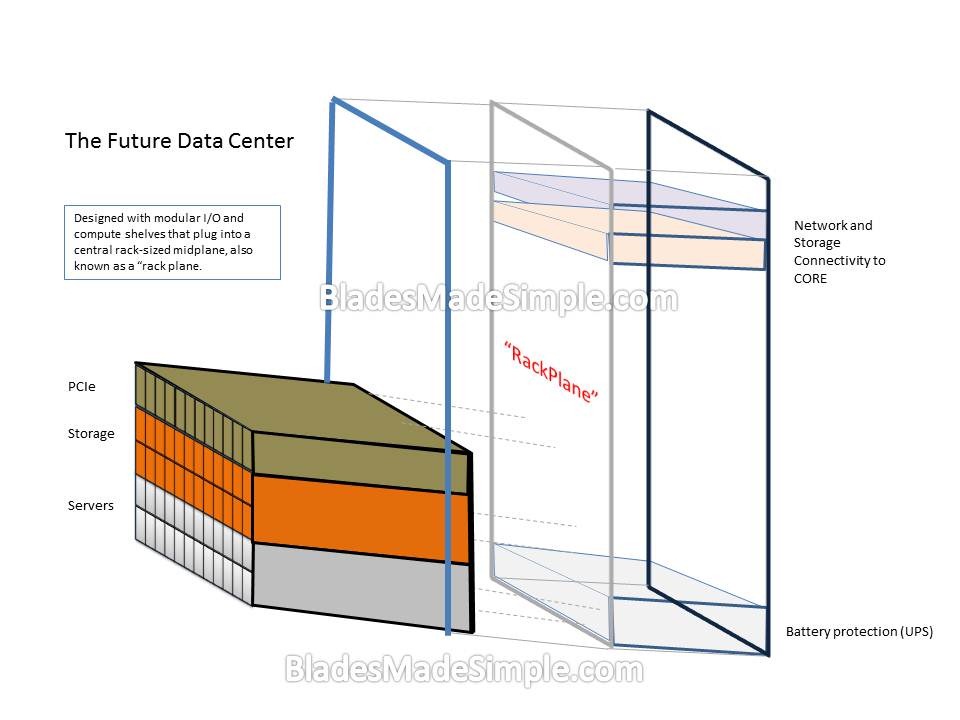
Blade servers rely on connectivity to the outside world through a mid-plane and I/O modules. They are containerized within the chassis that houses them allowing them to be an ecosystem for compute resources. What if we took the idea of how the blades connect to the blade chassis and extended it to an entire rack? Imagine having a shelf of blade servers that docked directly to a rack midplane (aka a “rackplane”). In fact, anything could be designed with this connectivity: storage trays, PCIe trays, power trays. What ever technology you need, be it compute power, storage or I/O could be added as needed. The beauty of this design is that the compute nodes could communicate with the storage nodes at “line speed” without the need for point-to-point cabling because they are all tied into the “rackplane”. Here’s what I think it would look like:

Future of Blades

On the front side of the modular rack, a user would have the option to plug in whatever is needed. For servers, I envision half-size blade servers housed in a 1 or 2U shelf. The shelf could hold any number of servers, but I would expect that a shelf of 8 – 12 servers would be ideal. Keep in mind, in this vision, all we need are CPUs and memory inside of a “blade server” so the physical footprint of the future blade server could be the size of today’s full-length PCIe card. Each of the shelves, whether they are servers, storage or compute, would have docking connectors similar to what we see on today’s blade servers but on a much larger scale. On the back side of the modular rack, you would have the option to add in battery protection (UPS), cooling and of course, I/O connectivity to your data center core fabrics.

One of the most obvious disadvantages of this design is that if you had a problem with your “RackPlane”, it would take a lot of resources off line. While that would be the case, I would expect that the design would have multiple rackplanes in place that would be serviceable. Of course, if the racks were stacked side-by-side with other racks, that could pose a problem – but hey, I’m just envisioning the future, I’m not designing it…

What are your thoughts on this? Am I totally crazy, or do you think we could see this in the next 10 years? I’d love your thoughts, comments or arguments. Thanks for reading.

Posted in Computers and Internet, Techie Hobbies | Tagged , | Leave a comment

HP Flex 10 vs VMware vSphere Network I/O Control for VDI

HP Flex 10 vs VMware vSphere Network I/O Control for VDI

from Blades Made Simpleby Dwayne Lessner

I once was a huge fan of HP’s Virtual Connect Flex-10 10Gb Ethernet Modules but with the new enhancements to VMware vSphere 5, I don’t think I would recommend for virtual environments anymore. The ability to divide the two onboard network cards up to 8 NICS was a great feature and still is, if you have to do physical deployments of servers. I do realize that there is the HP Virtual Connect FlexFabric 10Gb/24-port Module but I live in the land of iSCSI and NFS so that is off the table for me.

With vSphere 5.0, VMware improved on its VMware’s Virtual Distributed Switch (VDS) functionality and overall networking ability, so now it’s time to recoup some of that money on the hardware side. The way I see is most people with a chassis full of blade servers probably already have VMware Enterprise Plus licenses, so they are already entitled to VDS, however what you may not have known is that customers with VMware View Premier licenses are also entitled to use VDS. Some of the newest features found in VMware VDS 5 are:

 
· Supports NetFlow v5
· Port mirror
· Support for LLDP (Not just CISCO!)
· QoS
· Improved Priority features for VM traffic
· Network I/O Control (NIOC) for NFS

The last feature is the one that makes me think I don’t need to use HP’s Flex-10 anymore. Network I/O control (NIOC) allows you to assign shares to your network interfaces set priority, limits control congestions all in a dynamic fashion. What I particularly like about NIOC as compared to Flex-10 is the wasted bandwidth with hard limits. In the VDI world, the workload becomes very bursty. One example can be seen when using vMotion. When I’m performing maintenance work in a virtual environment I think it sure would be nice to have more than 2 GB/s a link to move the desktops off – however when you have to move 50+ desktops per blade you have to sit there and wait awhile. Of course, when this is your design, you wait because you wouldn’t want to suffer performance problems during the day by lack of bandwidth on services.

A typical Flex-10 configuration may break down the on board nic (LOM) something like this

Bandwidth vmnic NIC/SLOT Port Function
500 Mb/s 0 LOM 0A Management
2 Gb /s 1 LOM 0B vMotion
3.5 Gb /s 2 LOM 0C VM Networking
4 Gb/s 3 LOM 0D Storage (iSCSI/NFS)
500 Mb/s 4 LOM 1A Management
2 Gb /s 5 LOM 1B vMotion
3.5 Gb /s 6 LOM 1C VM Networking
4 Gb/s 7 LOM 1D Storage (iSCSI /NFS)

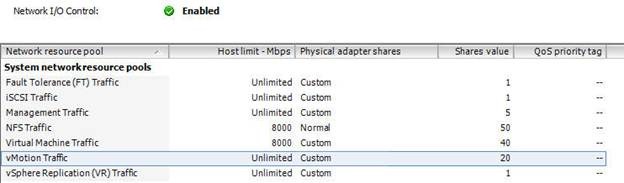
To get a similar setup with NIOC it may look something like this.

clip_image002

Total shares from above would be: 5 + 50 + 40 + 20 = 115

In this example FT, iSCSI and Replication don’t have to be counted as they will not be used. The shares only kick if there is contention. The shares are also only applied if the traffic type exists on the link. I think it would best practice to limit vMotion traffic as multiple vMotions kicking off could easily exceed the bandwidth. I think 8000 Mbps would be reasonable limit with this sort of setup.

Management: 5 shares; (5/115) X 10 Gb = 434.78 Mbps

NFS: 50 shares; (50/115) X 10 Gb = 4347.83Mbps

Virtual Machine: 40 shares; (40/115) * 10 Gb = 3478.26Mbps

vMotion: 20 shares; (20/115) X 10 Gb = 1739.13Mbps

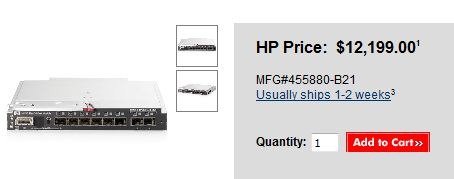
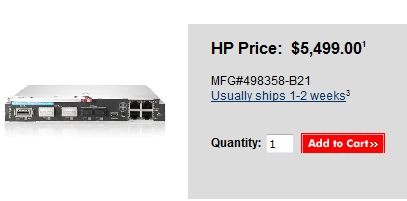
I think the benefits plus the cost saving is worth moving ahead with a 10GB design with NIOC. Below are some list prices taken on November 28, 2011. Which one are you going to choose?

Flex-10

clip_image003

HP_6120G-XG

clip_image004


Posted in Computers and Internet, Techie Hobbies | Tagged , | Leave a comment

Surveillance debunked: A guide to the jargon

Surveillance debunked: A guide to the jargon
December 1st, 2011 | by Privacy International | Published in All Stories, State of Surveillance, State of Surveillance – The Data

Many of the technologies and ideas contained in the Spy Files are obscure and unfamiliar. Privacy International has compiled this glossary, in which experts explain what these technologies are, how they work, and the implications they carry for privacy and civil liberties.

Digital forensics
Deep packet inspection
Social network analysis
Data mining
Backdoor trojans
Open source intelligence and social media monitoring
Webmail interception
Speech and voice recognition
Safe cities
IMSI catchers
Facial recognition
Mobile monitoring

Digital forensics
The ability to analyse the contents of computers, cellphones and digital storage devices, to make use of communications data and to intercept traffic is essential to modern law enforcement.

The word ‘forensic’ implies that the ultimate purpose of the activity is legal proceedings, and therefore that the authority to deploy specific digital forensic tools is granted within a strong framework of lawful powers and proper independent scrutiny of specific warrants, against the tests of necessity and proportionality. It suggests that the activities are subject to audit and produce evidence that can be exhaustively tested.

However, when the underlying technologies are deployed without these controls they can become unconstrained instruments of surveillance. Digital forensic tools have considerable capacity for intrusion.

The most widely used category of digital forensics tool makes a complete copy of a hard disk or other storage medium, including ‘deleted’ areas, and then exhaustively analyses it – a forensic disk image. The tools can: use keyword search for content, recover deleted files, create chronologies of events, locate passwords and, if more than one person uses the computer, attempt to attribute actions to a specific person.

A really well-designed encryption system is difficult to break, but many computer users deploy poorly designed programs or use them without all the associated disciplines so that unencrypted versions of files and/or passphrases can be located on a disk or other device.
Professor Peter Sommer – information security expert, London School of Economics and Open University

Deep packet inspection
Deep packet inspection (DPI) equipment is used to mine, mediate and modify data packets that are sent across the internet. By analysing the packets that carry conversations and commercial transactions and enable online gaming and video-watching, the content of each communication and the medium can be identified.

With this information, the equipment can then apply network-based rules that enable or disable access to certain content, certain communications systems and certain activities. Such rules may prioritise, deprioritise or even block particular communications paths.

As an example, when these rules are applied to a Voice over Internet Protocol (VoIP) telephony system such as Skype, the system may receive excellent service, have its service intentionally degraded or be blocked entirely if it encrypts communications. DPI can also modify communications traffic by adding data to, or removing data from, each packet.

Additions may enable corporate or state-backed surveillance of an individual’s actions and interactions online; subtractions include removing or replacing certain words in an email message, removing certain attachment types from email, or preventing packets from reaching their destinations.

This technology raises considerable privacy and security concerns, especially when employed by repressive governments. It enables covert surveillance of communications and has been used in Iran to ‘encourage’ citizens to use non-encrypted communications by blocking some data encryption and anonymisation services.

After shifting users towards non-encrypted, less secure, communications channels, the DPI equipment can identify log-ins, passwords, and other sensitive information, and can compromise subsequent encrypted communications paths between parties.

While DPI equipment is often sold under the guise of ‘simply’ ensuring efficient distribution of bandwidth between Internet subscribers or maintaining standard ‘lawful intercept’ powers, many of these devices can be re-provisioned for highly invasive mass surveillance, giving the state unparalleled insight into citizens’ communications and activities online.
Christopher Parsons is a PhD student at the University of Victoria who specialises in privacy and the internet

Social network analysis
Social network analysis treats an individual’s social ties as a kind of social graph, such that an analysis of the ties between different members of a social graph can reveal local and large-scale social structures.

Such analysis may focus on the number of connections between different individuals or groups, the proximity of different individuals or groups to one another, or the intensity of these connections (taking the frequency of interaction, for example, as a proxy). It can also reveal the degree of influence a person might have on his or her community, or the manner in which behaviours and ideas propagate across a network.

Police, security, and military analysts tend to rely on this kind of analysis to discover the collaborators of known criminals and adversaries. But less directed searches are also possible, in which analysts simply search for unusual structures or patterns in the network that seem to suggest illicit activity.
Solon Barocas – is a PhD student at New York University with interests in IT ethics and surveillance studies

Data mining – Solan Barocas
Data mining refers to a diverse set of computational techniques that automate the process of generating and testing hypotheses, with the goal of discovering non-intuitive patterns and structure in a dataset.

These discoveries can be findings in their own right because they reveal latent correlations, dependencies, and other relationships in the data—findings that support efforts like predictive policing. But these findings can also serve as a basis upon which to infer additional facts from the available data (a person’s preferences or propensities, for instance), acting as rules in programs that automatically distinguish between cases of interest.

Such programs have been especially attractive in the intelligence community because they would seem to hold the promise of automating the process of evaluating the significance of data by identifying cases of the relevant activity in the flow of information.

Such applications have been met with fierce opposition due to privacy and due process concerns (famously in the case of Total Information Awareness). Critics have also disputed data mining’s efficacy, highlighting problems with false positive rates. A 2008 National Academies report went so far as to declare that, because of inherent limitations, “pattern-seeking data-mining methods are of limited usefulness” in counterterrorism operations.
Solon Barocas

Backdoor trojans
These permit covert entry into and remote control of any computer connected to the internet. They can be combined with disk analysis tools, so that an entire computer can be searched remotely for content, including passwords.

It is also possible to abuse such techniques to alter and plant files and to masquerade as the legitimate user – such techniques can, however, often be detected by forensic examination. There are a huge number of examples, and many face the technical problem of how to hide their presence on a system.
Professor Peter Sommer

Open source intelligence and social media monitoring
Several tools have been developed to retrieve online images, video and text to help law enforcement or intelligence agencies to discover, track and analyse ‘terrorist content’, the users who post such content and the network in which this content circulates. Such content is defined by the user of these tools, and can consist for instance of text or video instructions on how to make an improvised explosive device (IED), Al Qaeda propaganda videos and images, or threats on an online forum.

The ongoing data deluge results in an ever-increasing demand for and production of such data-mining software that is able to automatically collect, search, and analyse words, sounds, and even sentiments, from open sources such as internet forums and social media.

Some tools claim, for instance, to be able to determine whether a poster on an online forum is getting more aggressive over time, by looking at the combination of writing style, word usage, use of special characters, punctuation and dozens more factors.

The focus on preventing terrorism, rather than investigating past crimes, along with the perceived tendency for terrorist groups to be organized in decentralized networks of ‘cells’, led to an increased interest in the use of social network analysis tools as well. Such tools support statistical investigation of the patterns of communication in groups, or the position of particular individuals in a network.

They can be used, for instance, to distinguish ‘opinion leaders’ and their fans on jihadi forums from other posters, but they can also be used to determine who has suspicious patterns of contacts with a known or suspected terrorist, or with any member of a known or suspected group of criminals from a large database of contacts.

All these technologies aim to discover patterns and content which would otherwise remain unnoticed, often in order to identify potential terrorists and possibly prevent them from committing a crime. While this is a legitimate goal for a society, these tools can easily be abused since the end-user can define what exactly the technology should be looking for.

Automatic text analysis tools can be used to find ‘terrorist content’, or attribute an ancient manuscript to a modern-day writer, but they can equally be used to track regime critics, or members of a suppressed religious or ethnic minority in authoritarian regimes.

It is not difficult to envisage the potential dangers of all these separate technologies, but the danger of abuse becomes even higher when they are combined with each other. Even when there is a legitimate aim, there is always a high risk of false positives attached to the use of this software, which can lead to innocent people being watched and tracked by government authorities.

It is also important to stress that open source information does not only consist of information you choose to make public about yourself online: it can also consist of information that you cannot avoid making public to a governmental authority (such as an application for a visa). All this information can be automatically mined and analysed, and eventually result in an action that ultimately limits your rights.
Mathias Vermeulen is a researcher with an interest in human rights and detection technologies

Webmail interception
Hundreds of millions of people around the world communicate using free email services provided by firms such as Google, Yahoo, Microsoft, and others. Although these companies offer similar email services, the security and privacy protections vary in important ways.

Specifically, Google uses HTTPS encryption by default, which ensures that emails and other information stay secret as they are transmitted between Google’s servers and the laptop or mobile phone of a user. In contrast, Yahoo, Microsoft and most other providers do not use encryption by default (or offer it at all in some cases).

The use of encryption technology significantly impacts the ability of law enforcement and intelligence agencies to obtain the emails of individuals under surveillance. Government agencies that wish to obtain emails stored by companies that use HTTPS by default, like Google, must contact the email provider and try to force them to deliver the communications data.

These service providers can, and sometimes do, push back against specific requests if they feel that the request is unlawful. They also generally ignore all requests from some repressive regimes, such as Iran or North Korea, when they do not have an office in that country.

In contrast, when governments wish to obtain emails sent via services like Yahoo and Hotmail that do not use HTTPS encryption, they can either ask the webmail company for the emails, or, because no encryption is used, directly intercept the communications data as it is transmitted over the network.

This requires the assistance of a local internet service provider, but such assistance is often far easier to obtain, particularly if the webmail company has no local office and is refusing to comply with requests. As a result, the decision to use a webmail service that encrypts data in transit can significantly impact your privacy – particularly if surveillance requests from your government would normally be ignored by foreign webmail providers.

Although HTTPS encryption can protect email communications against passive network surveillance by government agencies, this technology does not provide a 100% guarantee that the police or intelligence agencies are not listening. Web encryption technologies depend upon trusted third parties, known as ‘certificate authorities’ which allow browsers to identify the servers with which they are communicating.

Several of these certificate authorities are controlled by governments, and many others can be coerced by governments into creating false credentials that can be used to decode otherwise encrypted communications. Several commercial internet surveillance products specifically advertise their compatibility with such false credentials.
Chris Soghoian is a Washington, DC based Graduate Fellow at the Center for Applied Cybersecurity Research

Speech and voice recognition
In recent decades, security and law enforcement agencies have shown a keen interest in developing technologies that can identify individual voices (speaker recognition) and that can understand and automatically transcribe conversations (speech recognition).

The US National Security Agency currently funds the National Institute of Standards and Technology (NIST) to conduct annual reviews of cutting-edge speech software. Security analysts believe the agency and its overseas partners have used such systems for many years over public communications networks to detect target keywords and to transcribe conversations into text.

Commercial speech recognition systems are widely used but their accuracy reached a plateau more than a decade ago, and accuracy remains barely better than 50%.

However, newer systems being marketed to security agencies employ characteristics such as rhythm, speed, modulation and intonation, based on personality type and parental influence; and semantics, idiolects, pronunciations and idiosyncrasies related to birthplace, socio-economic status, and education level.

The result is a powerful technique that can deliver high accuracy at a speed that makes the software operationally viable for even the smallest agencies.
Simon Davies is director-general of Privacy International.

Safe cities
We all want to feel safe. Our ability to use and enjoy our cities and the relationships we establish with one another depend on this. Moreover, unsafe environments always exclude the most vulnerable.

However, anxiety over urban insecurities is on the increase worldwide, and the attention to risk and efforts to minimise insecurity at the local level seem to be failing to foster trust, security and co-operation.

In order to combat this, many governments have made security and community safety their top priority. Elections are won and lost over this issue, and once in office, the management of fear can make you or break you.

This concern over global and local threats and the perception of risk has taken the issue of security out of police stations, borders or critical infrastructures to embed security in all corners of local policy: urbanism, transport, traffic management, open data and more. The drive to minimise the unexpected and convey a sense of control is today a fixed item in the political agenda.

This increased attention to risk, however, is failing to increase feelings of security. It seems evident that the attention to these issues has failed to make us better at calculating and reacting to potential dangers, and current security policy at the local level is more based on adopting prescriptions from other cities than on an actual diagnosis of the specific sources of danger and insecurity in a given territory.

Moreover, local governments are using security technology traditionally deployed in foreign policy and border control to monitor city life as a way to show political muscle and authority, often overlooking the social and legal consequences of surveillance technologies and the normalisation of control.
Gemma Galdon Clavell is a researcher based at the Universitat Autònoma de Barcelona, where she focuses on public policy, community safety, surveillance and public space

IMSI catcher
An IMSI catcher is an eavesdropping device used for interception of mobile phones. They are portable devices, now as small as a fist, that pretend to be a legitimate cell phone tower that emits a signal to dupe thousands of mobile phones in a targeted area. Authorities can then intercept SMS messages, phone calls and phone data, such as unique IMSI and IMEI identity codes that allow authorities to track phone users’ movements in real-time, without having to request location data from a mobile phone carrier.

In addition to intercepting calls and messages, the system can be used to effectively cut off phone communication for crowd control during demonstrations and riots where participants use phones to organise.

It is unclear how the use of IMSI catchers can be justified legally, and while evidence that they are a common tool for law enforcement is growing, few have come clean on their use.

In repressive regimes, IMSI catchers are especially concerning, given the ease with which these technologies could unmask and identify thousands of people demonstrating. In the UK, excessive and disproportionate use of IMSI catchers is likely to have chilling effects on the freedom of association and legal public protest.
Eric King is director of policy at Privacy International

Facial recognition technology
Facial recognition technology automates the identification of people – or verification of a claimed identity. It uses sophisticated computer algorithms to measure the distances between various features of a person’s face and compares them to a gallery of images on a database, or, in the case of 1-to-1 verification, against the image of a ‘suspect’.

A camera first captures an image of a person’s face, which sometimes happens surreptitiously and presents serious civil liberties concerns. This image is called the ‘probe’ image. The software then processes this probe image to extract the relevant features of the face, which is compared against a database of previously collected images, or a single image in the case of 1-to-1 verification.

As facial recognition is inherently probabilistic, the algorithm produces a ‘score’ that depicts the likelihood of a match. A human operator is therefore usually required to decide whether the algorithmic match is ‘true’.

While the facial recognition process is largely automated, humans are still required to confirm or reject a potential hit, which may introduce bias into the system.

There are many factors that affect the performance, effectiveness and reliability of facial recognition systems. First, the system can only recognise people whose images are enrolled in the gallery. So an outstanding concern is how databases are populated with records. Second, image quality is a major issue.

Poor lighting conditions, extreme camera angles, camera distance, old images, large gallery size, and obscured faces will affect on system’s performance. Third, facial recognition systems have a ‘sensitivity threshold’ that must be set by the operator.

A low threshold will produce false positives – an innocent person will be subjected to increased scrutiny based on resemblance to a person on the suspect list. And setting the threshold too high will result in false negatives. Facial recognition systems cannot be set to simultaneously give both fewer false positives and fewer false negatives. So error is necessarily a part of facial recognition systems.

The use of these technologies presents numerous privacy concerns. Because images can be collected at a distance, subjects may not be aware that their images are being recorded and included in a gallery. Surreptitious use of facial recognition makes a mockery of the concept of consent, for example when it is combined with video surveillance technology (CCTV).

The use of facial recognition systems in public places, such as during peaceful public protests or marches, may have a chilling effect on free speech and political association. And where operators are poorly trained or systems are misused, there is a risk that people are falsely identified as a criminal or wrongdoer and may face difficulties explaining that the facial recognition software got it wrong.
Aaron K Martin is a privacy and IT policy researcher in the Information Systems and Innovation Group at the London School of Economics.

Mobile monitoring
Mobile phone communication can be monitored either on the device side using software installed clandestinely on the mobile device, or on the network side by monitoring the activity of a particular use.

On the device side, there are numerous vendors who supply ‘spyware’ that, when installed directly or remotely on a person’s mobile device can track calls, SMS, email, contacts, location, photos, videos, events, task, memos, and even remotely activate a mobile’s microphone to act as a clandestine listening device. Data is secretly sent back from the device the vendor’s servers where it resides.

While buying this kind of software is not illegal in many countries, how it is used may be in violation of wiretapping laws without a court order. The use of this ‘spyware’ on devices also raises significant ethical and privacy concerns.

On the network side, mobile operators routinely log information about users, their devices, and their behaviour on the network. Much of this is due to the fact that mobile operators bill their customers for services rendered. In other words, monitoring is inherently built into mobile networks’ core business model.

Network operators log the user’s device unique serial number (IMEI), the SIM card number (IMSI) (which may be uniquely tied to the identity of a user due to SIM card registration requirements now ubiqutous in repressive regimes), call and SMS logs, location of the device on the network either by way of tower triangulation or GPS, and a host of other data.

Much of the data flowing over the network is in plain text (such as SMS, for instance), so can be easily and inexpensively monitored by a network operator or an intelligence agency in cooperation with the network operator. Operators, by their licence terms, in most countries are obliged to provide information for ‘lawful intercept’ purposes – which, in many repressive regimes is a fungible concept.

Katrin Verclas is the co-founder and editor of MobileActive.org, an organisation exploring the ways in which mobile phones can be used for activism and other social activity

Posted in Computers and Internet, Techie Hobbies | Tagged | Leave a comment