How to login to an expired Windows

How to login to an expired Windows

Microsoft has a neat little way to prevent software piracy of their Windows operating system. "Windows Genuine
Advantage" with its "Product Activation" requirement. Essentially, even
with a valid product key, you still need to activate your Windows to
ensure that only one computer is using that specific product key. If
you can’t activate your Windows, there being many reasons for this, you
are left with a 30 day grace period to change your product key to one
that is fully valid or get in contact with Microsoft and plea your case.

Once your grace period is up, Windows refuses to let you login
anymore. You cannot access your files. You cannot go on the Internet.
You cannot do anything, except the thrill of trying to activate Windows.

Well,
luckily for me I do not have to worry about this issues, as my Windows
is valid and activated. However, for those who do not and have been so
unfortunate enough to have their Windows expire on them, I present to
you a bit of relief. How to gain access to your files on an expired
Windows, with even enough functionality to surf the web, talk on MSN
Messenger, and load up most of your applications. It doesn’t give you
full functionality of Windows, but it will be enough to get the job
done until you can find the time to activate your Windows. Best of all though, it’s all very simple and easy to do!!!

First, turn on your computer and wait until you get to the Windows login screen.

Next, click to login
as usual. You should get an error from Windows telling you that your
Windows has expired and is asking whether you would like to activate
Windows now. Click Yes.

A "Let’s activate Windows" window will appear. Let’s minimize it. DO NOT close it.

Now,
hold down the Windows Key on your keyboard while you also press the "U"
key. This will open up the Narrator program to help assist those with
poor vision. It is this program that will help us login to our Windows.

Click
the little computer icon in the top left hand side of the Narrator
window. A drop down menu should appear. The last option in this menu is
named "About Narrator…". Click it. This should open up another window
called "About Narrator".

In this window, there should be the text "Microsoft Web site".
Click it, as it is a link and will open up your Internet Explorer,
taking you to the Microsoft Accessibility website. Howrah! Internet
access!

As
if Internet was not enough, in the address bar of Internet Explorer,
type "c:\". This should display all your hard drive contents on drive
"C". From there you can load navigate your way around your computer,
loading specific programs, and most whatever else.

Some common directories as to where you can find personal files and programs are:

C:\program files\
C:\documents and settings\username\Desktop\
C:\documents and settings\username\Documents\
C:\documents and settings\username\Start Menu\Programs\

On
a side note, certain programs cannot be opened while Windows is still
not activated. You will also not have a Task Bar at the bottom of your
screen, as trying to open it will just result in it shutting itself
down a few moments later. MSN Messenger works though, as well as most other non-Windows-based components.

Disclaimer:
I do not applaud piracy, but I do feel people should have access to
their personal files, regardless of whether Windows has expired or not.
This tutorial should not be used to bypass Windows Activation, nor does
it restore full Windows functionality, but I provide it to those who
are in desperate need of accessing files that are suddenly lost to them
through the Microsoft Genuine Advantage activation system.

Posted in Computers and Internet | Leave a comment

Hackers Release Permanent Spoof Vista Activation Server


Hackers have found a way around Microsoft Vista’s activation system. Unlike Windows XP and Volume Activation 1.0 Wndows Vista doesn’t have any corporate keys which will permanently activate it.

Volume Activation 2.0 requires a corporate user to either do a onetime activation through Microsoft servers (MAK) or companies can host a local activation server which does not talk to Microsoft (KMS). The only difference is KMS requires re-activation once every 180 days. However as long as there’s a local KMS server it’s simple to keep Windows Vista activated.

The hacker’s release is a VMware image of a permanently activated KMS (Key Management Service) server which allows local activation of Windows Vista Business/Enterprise Edition. As such, it’s not true that the workaround will be usable for only six months. Press reports stating so are written by people who don’t know what they’re talking about. The "client" Vista activates every six months, not the server, which in this case is permanently activated.

Volume Activation 2.0 is only built into those two editions. Companies which buy 25 numbers or more of the OS would be given the KMS to simplify the activation process. For it to work, users have to type in the non-virtual Vista two commands which launch the same Visual Basic script with different options:

cscript c:\windows\system32\slmgr.vbs -skms vm_vista_ip
cscript c:\windows\system32\slmgr.vbs -ato

The hack was released under the name of Bill Gates’ wife, Melinda Gates. The actual name of the pirate scene release is "Microsoft.Windows.Vista.Local.Activation.Server-MelindaGates." Cracked copies of Windows Vista started flooding the internet soon after the operating system was released to manufacturing and ahead of its official release. However, the lack of a corporate activation key made most of them useless. Some activation cracks were apparently released, using some beta files from RC versions of Vista, but apparently they didn’t work for everyone.

This only shows that while Microsoft tries to block illegal users from using its operating systems, they will not be able to prevail for long. For every security system there’s always a workaround if you have physical access to the machine, that’s a rule every security expert knows. Everything can be cracked eventually, if it’s worth it.

Posted in Computers and Internet | Leave a comment

Wardriving Using An Ubuntu Notebook With Garmin Etrex, Kismet, And GPSDrive

Wardriving Using An Ubuntu Notebook With Garmin Etrex, Kismet, And GPSDrive


This tutorial is about wardriving using GPS.  It explains how to install Garmin Etrex on Ubuntu and how to configure it. It also shows how to use Garmin with GPSDrive and how to convert  the data to an xml file which can be imported by Google Earth.

Status (11/16/2005)

  • Ubuntu 5.10 "The Breezy Badger"
  • Kernel 2.6.12-9
  • Garmin Etrex Camo

Hardware

To connect the Garmin Etrex with my notebook (Sony Vaio TR5MP) I needed a serial cable and a USB converter. You can order the cable and the converter at http://pfranc.com/cgi-bin/pub/u_OR?pid=eUSB1.

Software preparation

As first you have to download few tools that we are going to use later.

  • gpsd
  • gpsdrive
  • kismet

Download these packages with apt-get:

# sudo apt-get install gpsd
# sudo apt-get install gpsdrive
# sudo apt-get install kismet

Plugin Garmin and prepare gpsd

I had a couple of problems with configure Garmin. First plug in only the converter. You can check it with dmesg if the converter was recognised.

# dmesg

[4309567.512000] mct_u232 1-2:1.0: MCT U232 converter detected
[4309567.523000] usb 1-2: MCT U232 converter now attached to ttyUSB0

The converter should now be attached to ttyUSB0, which we use later to start gpsd. Now turn on the Garmin Etrex and wait until you have a good signal and plug it in at the converter. You can now test if Ubuntu recieve data from Garmin.

# cat /dev/ttyUSB0

Now you can start gpsd.

# gpsd -p /dev/ttyUSB0

To test if you recieve data you can connect to gpsd over telnet and type "r". It should print out some data. Type "r" again to stop it

# telnet localhost 2947
Trying 127.0.0.1…
Connected to localhost.localdomain.
Escape character is ‘^]’.
r
GPSD,R=1 $GPRMB,A,,,,,,,,,,,,A,A*0B
$GPGGA,050726,3748.4356,N,12214.6037,W,1,06,1.4,45.5,M,-27.8,M,,*4B
$GPGSA,A,3,,06,15,16,,21,22,,29,,,,2.9,1.4,2.5*36
$GPGSV,3,1,09,03,18,315,00,06,41,152,44,15,61,323,34,16,27,271,35*7C
$GPGSV,3,2,09,18,82,255,00,21,65,038,41,22,43,233,37,26,31,058,00*74
$GPGSV,3,3,09,29,23,046,37*4C $GPGLL,3748.4356,N,12214.6037,W,050726,A,A*59
r
GPSD,R=0 quit

There is one problem I couldn’t solve. When I close a application that used gpsd I couldn’t use gpsd agin until I restarted gpsd. I also have to plug out Garmin and plug it in again. There was a message in dmesg:

[4310134.687000] drivers/usb/serial/mct_u232.c: MCT USB-RS232: unsupported baudrate request 0x0, using default of B9600

If someone has a solution for this please let me know.

Run Kismet

Kismet has to work if you have a Cisco 350 Series Card you might have a look at this howto [1]

Edit following entries in /etc/kismet/kismet.conf with your favourite editor:

gps=true
waypoints=true
waypointdata=~/.gpsdrive/way.txt  

Save it and exit.

Prepare GpsDrive

In order to use GpsDrive with Kismet we have to change some settings. GpsDrive is able to save the waypoints in a SQL-Database. It is highly recommended to use it. If you want to use it you have to install the mysql-server, mysql-client and libmysqlclient packages and then import the create.sql file that creates a database and its tables. It also creates a user gast / gast. Start the mysql server and import the create.sql file

# /etc/init.d/mysql start
# mysql -u root < /usr/share/gpsdrive/create.sql

If you have set a mysql-root password you have to use the option -p, for example

# mysql -u root -p < /…../create.sql

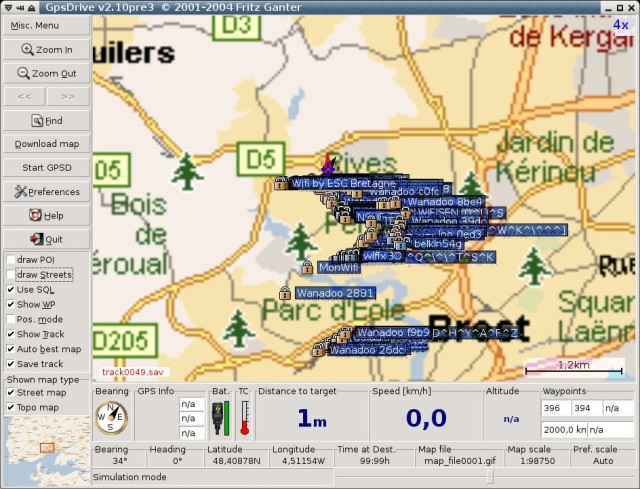
Now run GpsDrive. If everything is ok you should see now a Map. (The data you see are dummy data.) We will connect Garmin later. If you want to use MySQL check the checkbox Use SQL.

Your map will be different because it is your first time to use GpsDrive. Now go to Preferences -> Settings 2 and set Interface to /dev/ttyUSB0. Check also Test for Garmin and Use serial conn.

Now you can close GpsDrive.

Start everything

Now we will start everything and get ready for wardriving )(

  • Plugin Converter.

  • Plugin Garmin (be careful that you have a good signal).

  • Check data with

    # cat /dev/ttyUSB0

  • Run gpsd with

    # gpsd -p /dev/ttyUSB0

  • Run kismet.

  • Run gpsdrive.

Now you should see the accesspoints in your map. Of course only if kismet found something. 🙂

Google Earth

If you want you can use Google Earth to get a better view. Download and install GoogleEarth for Linux: http://earth.google.com/download-earth.html

In order to use Google Earth you have to run this script [2] which I found here http://www.larsen-b.com/Article/212.html THX.

After running this script it will create a file ap.kml. Now you can open this file with Google Earth. Have fun…

Links

Posted in Computers and Internet | Leave a comment

USB Hacksaw

Released on HAK.5 Episode 2×03 — The USB Hacksaw is an evolution of the popular USB Switchblade that uses a modified version of USBDumper, Blat, Stunnel, and Gmail to automatically infect Windows PCs with a payload that will retriev documents from USB drives plugged into the target machine and securely transmit them to an email account. Proof of concept code shows how to deliver the payload instantly with a U3 autorun hack borrowed from the USB Switchblade on Windows 2000 or higher computers running as administrator or guest. Automatic propogation to other USB devices is possible however was not shown on Episode 2×03.

Contents

[hide]

Description

The purpose of this hack, dubbed USB Hacksaw for googleability, is to automatically and silently install on windows 2000, XP, or 2003 machines with either administrator or guest access. Installation consists of hiding the hacksaw tools in a hidden folder, add to either registry or startup folder depening on user rights, and start the program.

This hack is based on a modified version of USBDumper. Once installed on a targert machine it will stay resident and wait for a USB flash drive to be inserted. Once a USB flash drive is inserted the hacksaw will download the contents of the drive to a temporary location using the modified USBDumper, then silently run the send.bat file located in the same directory, which will then archive the contents using RAR, eastablish an SSL SMTP connection to smtp.gmail.com using Stunnel and Blat, email the downloaded data to an email address, and remove the documents and archives.

The proof of concept code in this 0.1 version is not as pretty as it could be. Originally a method for determining user rights and thus installing accordingly was planned, however problems with the IFMEMBER command were found and many dirty hacks followed. Future versions are expected to use a more elegent method of determining user privledges. (Thinking outloud: try creating a file where guests shouldnt be able to and check errorlevel).

Development of this project has been done with the aid of the Hak.5 community at http://www.hak5.org

Programs used

Requirements

  • U3 Enabled USB Flash Drive (or other hacked USB drive that allows autorun. More details to come)

Creating a USB Hacksaw

  1. Insert U3 SanDisk Cruzer Micro USB Drive
  2. Run LPInstaller.exe from /loader_u3_sandisk. This will flash the CDFS partitoin of the U3 SanDisk Cruzer Micro USB Drive
  3. Copy the WIP directory in /payload to the root of the flash drive partition on the U3 SanDisk Cruzer Micro USB Drive.
  4. Edit the /wip/sbs/send.bat file. The following paramaters need to be added

## emailfrom (Gmail address from which the documents will be sent) ## emailto (Email address where the documents will be sent) ## password (Password of Gmail account used in 4a)

  1. You now have a USB Hacksaw

Installing on target computer

  • Insert the USB Hacksaw into a Windows 2000, XP, or 2003 computer
  • Wait until the drive has been recognized and either the flash partition opens in explorer, or a menu appears asking what to run.
  • Eject USB Hacksaw

Usage

  • Insert non-hacksaw USB Flash drive into compromised computer
  • Once recognized the sbs.exe process will copy data to the /docs directory where the USB Hacksaw has been installed, then silently run send.bat
  • Send.bat will process the documents in /docs by archiving them to goodies.rar using RAR, establish an SSL connection to smtp.gmail.com using Stunnel, and transmitting them to the email address designated in the emailto variable using Blat. Send.bat will then remove the /docs and goodies*.*

Uninstallation

Copy the contents of the /antidote directory to an infected computer and run the hacksaw–antidote.cmd file. This crude batch file will kill USB Hacksaw processes, delete files, and remove registry changes.

Changelog

  • 0.2 POC

Added for statement to sendfiles section of send.bat, no longer makes me feel dirty. Thanks hauser!

  • 0.1 POC

Original dirty hack demonstrated on Hak.5 episode 2×03

Downloads

SwissBlade

You can just add Hacksaw to your existing Switchblade by copying the SBS folder inside the CMD folder and add the go.cmd to your current go.cmd.

Also See

Posted in Computers and Internet | Leave a comment

The Secret Letter From Iraq


Friday, Oct. 06, 2006
The Secret Letter From Iraq
A Marine’s letter home, with its frank description of life in "Dante’s inferno," has been circulating through generals’ in-boxes. We publish it here with the author’s approval

Written last month, this straightforward account of life in Iraq by a Marine officer was initially sent just to a small group of family and friends. His honest but wry narration and unusually frank dissection of the mission contrasts sharply with the story presented by both sides of the Iraq war debate, the Pentagon spin masters and fierce critics. Perhaps inevitably, the ‘Letter from Iraq’ moved quickly beyond the small group of acquantainaces and hit the inboxes of retired generals, officers in the Pentagon, and staffers on Capitol Hill. TIME’s Sally B. Donnelly first received a copy three weeks ago but only this week was able to track down the author and verify the document’s authenticity. The author wishes to remain anonymous but has allowed us to publish it here — with a few judicious omissions.

All: I haven’t written very much from Iraq. There’s really not much to write about. More exactly, there’s not much I can write about because practically everything I do, read or hear is classified military information or is depressing to the point that I’d rather just forget about it, never mind write about it. The gaps in between all of that are filled with the pure tedium of daily life in an armed camp. So it’s a bit of a struggle to think of anything to put into a letter that’s worth reading. Worse, this place just consumes you. I work 18-20-hour days, every day. The quest to draw a clear picture of what the insurgents are up to never ends. Problems and frictions crop up faster than solutions. Every challenge demands a response. It’s like this every day. Before I know it, I can’t see straight, because it’s 0400 and I’ve been at work for 20 hours straight, somehow missing dinner again in the process. And once again I haven’t written to anyone. It starts all over again four hours later. It’s not really like Ground Hog Day, it’s more like a level from Dante’s Inferno.

Rather than attempting to sum up the last seven months, I figured I’d just hit the record setting highlights of 2006 in Iraq. These are among the events and experiences I’ll remember best.

Worst Case of D骠 Vu — I thought I was familiar with the feeling of d骠 vu until I arrived back here in Fallujah in February. The moment I stepped off of the helicopter, just as dawn broke, and saw the camp just as I had left it ten months before — that was d骠 vu. Kind of unnerving. It was as if I had never left. Same work area, same busted desk, same chair, same computer, same room, same creaky rack, same . . . everything. Same everything for the next year. It was like entering a parallel universe. Home wasn’t 10,000 miles away, it was a different lifetime.

Most Surreal Moment — Watching Marines arrive at my detention facility and unload a truck load of flex-cuffed midgets. 26 to be exact. We had put the word out earlier in the day to the Marines in Fallujah that we were looking for Bad Guy X, who was described as a midget. Little did I know that Fallujah was home to a small community of midgets, who banded together for support since they were considered as social outcasts. The Marines were anxious to get back to the midget colony to bring in the rest of the midget suspects, but I called off the search, figuring Bad Guy X was long gone on his short legs after seeing his companions rounded up by the giant infidels.

Most Profound Man in Iraq — an unidentified farmer in a fairly remote area who, after being asked by Reconnaissance Marines if he had seen any foreign fighters in the area replied "Yes, you."

Worst City in al-Anbar Province — Ramadi, hands down. The provincial capital of 400,000 people. Lots and lots of insurgents killed in there since we arrived in February. Every day is a nasty gun battle. They blast us with giant bombs in the road, snipers, mortars and small arms. We blast them with tanks, attack helicopters, artillery, our snipers (much better than theirs), and every weapon that an infantryman can carry. Every day. Incredibly, I rarely see Ramadi in the news. We have as many attacks out here in the west as Baghdad. Yet, Baghdad has 7 million people, we have just 1.2 million. Per capita, al-Anbar province is the most violent place in Iraq by several orders of magnitude. I suppose it was no accident that the Marines were assigned this area in 2003.

Bravest Guy in al-Anbar Province — Any Explosive Ordnance Disposal Technician (EOD Tech). How’d you like a job that required you to defuse bombs in a hole in the middle of the road that very likely are booby-trapped or connected by wire to a bad guy who’s just waiting for you to get close to the bomb before he clicks the detonator? Every day. Sanitation workers in New York City get paid more than these guys. Talk about courage and commitment.

Second Bravest Guy in al-Anbar Province — It’s a 20,000 way tie among all these Marines and Soldiers who venture out on the highways and through the towns of al-Anbar every day, not knowing if it will be their last — and for a couple of them, it will be.

Worst E-Mail Message — "The Walking Blood Bank is Activated. We need blood type A+ stat." I always head down to the surgical unit as soon as I get these messages, but I never give blood — there’s always about 80 Marines in line, night or day.

Biggest Surprise — Iraqi Police. All local guys. I never figured that we’d get a police force established in the cities in al-Anbar. I estimated that insurgents would kill the first few, scaring off the rest. Well, insurgents did kill the first few, but the cops kept on coming. The insurgents continue to target the police, killing them in their homes and on the streets, but the cops won’t give up. Absolutely incredible tenacity. The insurgents know that the police are far better at finding them than we are — and they are finding them. Now, if we could just get them out of the habit of beating prisoners to a pulp . . . Greatest Vindication — Stocking up on outrageous quantities of Diet Coke from the chow hall in spite of the derision from my men on such hoarding, then having a 122mm rocket blast apart the giant shipping container that held all of the soda for the chow hall. Yep, you can’t buy experience.

Biggest Mystery — How some people can gain weight out here. I’m down to 165 lbs. Who has time to eat?

Second Biggest Mystery — if there’s no atheists in foxholes, then why aren’t there more people at Mass every Sunday?

Favorite Iraqi TV Show — Oprah. I have no idea. They all have satellite TV.

Coolest Insurgent Act — Stealing almost $7 million from the main bank in Ramadi in broad daylight, then, upon exiting, waving to the Marines in the combat outpost right next to the bank, who had no clue of what was going on. The Marines waved back. Too cool.

Most Memorable Scene — In the middle of the night, on a dusty airfield, watching the better part of a battalion of Marines packed up and ready to go home after over six months in al-Anbar, the relief etched in their young faces even in the moonlight. Then watching these same Marines exchange glances with a similar number of grunts loaded down with gear file past — their replacements. Nothing was said. Nothing needed to be said.

Highest Unit Re-enlistment Rate — Any outfit that has been in Iraq recently. All the danger, all the hardship, all the time away from home, all the horror, all the frustrations with the fight here — all are outweighed by the desire for young men to be part of a band of brothers who will die for one another. They found what they were looking for when they enlisted out of high school. Man for man, they now have more combat experience than any Marines in the history of our Corps.

Most Surprising Thing I Don’t Miss — Beer. Perhaps being half-stunned by lack of sleep makes up for it.

Worst Smell — Porta-johns in 120 degree heat — and that’s 120 degrees outside of the porta-john.

Highest Temperature — I don’t know exactly, but it was in the porta-johns. Needed to re-hydrate after each trip to the loo.

Biggest Hassle — High-ranking visitors. More disruptive to work than a rocket attack. VIPs demand briefs and "battlefield" tours (we take them to quiet sections of Fallujah, which is plenty scary for them). Our briefs and commentary seem to have no affect on their preconceived notions of what’s going on in Iraq. Their trips allow them to say that they’ve been to Fallujah, which gives them an unfortunate degree of credibility in perpetuating their fantasies about the insurgency here. Biggest Outrage — Practically anything said by talking heads on TV about the war in Iraq, not that I get to watch much TV. Their thoughts are consistently both grossly simplistic and politically slanted. Biggest Offender: Bill O’Reilly.

Best Intel Work — Finding Jill Carroll’s kidnappers — all of them. I was mighty proud of my guys that day. I figured we’d all get the Christian Science Monitor for free after this, but none have showed up yet.

Saddest Moment — Having an infantry battalion commander hand me the dog tags of one of my Marines who had just been killed while on a mission with his unit. Hit by a 60mm mortar. He was a great Marine. I felt crushed for a long time afterward. His picture now hangs at the entrance to our section area. We’ll carry it home with us when we leave in February.

Best Chuck Norris Moment — 13 May. Bad Guys arrived at the government center in a small town to kidnap the mayor, since they have a problem with any form of government that does not include regular beheadings and women wearing burqahs. There were seven of them. As they brought the mayor out to put him in a pick-up truck to take him off to be beheaded (on video, as usual), one of the Bad Guys put down his machinegun so that he could tie the mayor’s hands. The mayor took the opportunity to pick up the machinegun and drill five of the Bad Guys. The other two ran away. One of the dead Bad Guys was on our top twenty wanted list. Like they say, you can’t fight City Hall.

Worst Sound — That crack-boom off in the distance that means an IED or mine just went off. You just wonder who got it, hoping that it was a near miss rather than a direct hit. Hear it practically every day.

Second Worst Sound — Our artillery firing without warning. The howitzers are pretty close to where I work. Believe me, outgoing sounds a lot like incoming when our guns are firing right over our heads. They’d about knock the fillings out of your teeth.

Only Thing Better in Iraq Than in the U.S. — Sunsets. Spectacular. It’s from all the dust in the air.

Proudest Moment — It’s a tie every day, watching our Marines produce phenomenal intelligence products that go pretty far in teasing apart Bad Guy operations in al-Anbar. Every night Marines and Soldiers are kicking in doors and grabbing Bad Guys based on intelligence developed by our guys. We rarely lose a Marine during these raids, they are so well-informed of the objective. A bunch of kids right out of high school shouldn’t be able to work so well, but they do.

Happiest Moment — Well, it wasn’t in Iraq. There are no truly happy moments here. It was back in California when I was able to hold my family again while home on leave during July.

Most Common Thought — Home. Always thinking of home, of my great wife and the kids. Wondering how everyone else is getting along. Regretting that I don’t write more. Yep, always thinking of home.

I hope you all are doing well. If you want to do something for me, kiss a cop, flush a toilet, and drink a beer. I’ll try to write again before too long — I promise.

Copyright © 2006 Time Inc. All rights reserved.
Reproduction in whole or in part without permission is prohibited.
Posted in News and politics | Leave a comment

Windows Mobile Device Center (Beta 3 Release) for Windows Vista RC1

The Microsoft Windows Mobile Device Center Beta enables you to set up new partnerships, synchronize content and manage music, pictures and video with any Windows Mobile 2003 or Windows Mobile 5.0 powered device. The Windows Mobile Device Center Beta is only supported on Windows Vista RC1 . and RC 2

The Windows Mobile Device Center Beta combines an efficient business-data synchronization platform with a compelling user experience. Windows Mobile Device Center Beta helps you to quickly set up new partnerships, synchronize business-critical information such as e-mail, contacts and calendar appointments, and easily manage your synchronization settings.

The Windows Mobile Device Center Beta simplifies managing media between your Windows Mobile powered device and your desktop PC. With the picture acquisition wizard, you can easily tag and transfer all of the pictures from your Windows Mobile powered device to your desktop PC’s Windows Photo Gallery. Microsoft Windows Media Player helps you keep the music on your Windows Mobile powered device up-to-date.

Features include:
  • Streamlined setup – A simplified new partnership wizard and improved partnership management.
  • Robust synchronization – Synchronization of business-critical data such as e-mail, calendars, contacts, tasks, favorites, and files.
  • Photo management – Picture management helps you detect new photos on your Windows Mobile powered device, tag and import them to the Windows Vista Photo Gallery.
  • Media synchronization – Use Microsoft Windows Media Player to synchronize and shuffle music files on your device.
  • File browsing – A new device browsing experience enables you more quickly browse files and folders and open documents on your device directly from your PC.
  • Enhanced user interface – A simple and compelling user interface helps you to quickly access critical tasks and configure your device.
The Windows Mobile Device Center Beta is compatible with Windows Mobile 2003 and Windows Mobile 5.0 devices.

Download At Source: http://www.microsoft.com/windowsmobile/devicecenter.mspx

Posted in Computers and Internet | Leave a comment

Microsoft issues warning to Volume License customers over Windows Genuine Advantage fail

Phil Liu of Microsoft has reported problems with the Windows Genuine Advantage authentication method for Volume License Key (VLK) customers and a temporary work-around

"Just a heads up on an issue related to (Volume) VLK validation. On Monday and Tuesday of this week (Oct 2-3), some VLK customers may have experienced problems with WGA validation. If a Windows XP system with a VLK recently began failing validation or reporting as non-genuine, then they may experiencing this problem. The problem was the result of an issue on the Microsoft server side, and we are still investigating the cause. We regret any inconvenience this may have caused you, and I am personally working to get the information you need to resolve this issue.

We do have steps available that affected customers can take to correct the problem, and we’ll continue to work on solutions and post them on this forum."

Customers who are affected can:

  1. Delete the data.dat file from c:\Documents and Settings\All Users\Application Data\Windows Genuine Advantage\data (The drive letter will depend on where the OS was installed)
  2. Revisit http://www.microsoft.com/genuine/downloads/validate.aspx to confirm that the machine is now genuine.
  3. Run wgatray.exe /b from the command line to ensure that the latest validation is updated for WGA Notifications. This command may not be present on the user’s machine and should not be considered an error if it is not. Please ensure that this is run as an Administrator. A reboot may be required to remove all non-genuine notifications.

Source: http://www.neowin.net/index.php?act=view&id=35401


Posted in Computers and Internet | Leave a comment

Download everything from Microsoft without WGA Check

Download everything from Microsoft without WGA Check

Monday, September 4th, 2006 | Translate to:

When you want to download a file from Microsoft a WGA (windows genuine advantage) check is performed. Microsoft installs a small piece of software on your computer that contacts the Microsoft server and checks for validity. If the test fails you will not be able to download the file(s). The following method gives you the ability to download every file from Microsoft without a WGA check.

All you need is the tool mgadiag.exe and the download url of the file that you want to download. Mgadiag.exe is the Microsoft Genuine Advantage Diagnostic Tool. Start this tool and check the value of the “Download Center Code”, this should be seven chars consisting of upper case letters and numbers. Remember that code and open the website of the file that you want to download.

A download page looks similar to this one for Internet Explorer 7. All you need to do is append the following value to the url and you will be able to download the file without a WGA check.

&Hash=”download center code”

Replace the “download center code” with the code that you looked up in the mgadiag.exe tool. This code changes frequently, make sure you have the correct code before starting the downloads.

To sum it up for the lazy ones:

  1. download mgadiag.exe
  2. start mgadiag.exe and look at the download center code
  3. visit a download page at microsoft.com
  4. append &Hash=”download center code” to the url (example &Hash=6VJPCR9), no quotation marks needed
  5. Hit enter

Microsoft is probably going to fix this soon, it is working nevertheless at the moment.

Update: I created two images to show you the difference that the &hash= entry makes:

Posted in Computers and Internet | Leave a comment

Original Signal outdoes Digg — with Digg’s own content

Original Signal outdoes Digg — with Digg’s own content

September 8, 2006 2:19 PM PDT

I like the meta-aggregators ("metagators," if you will) PopURLs and Original Signal so much that I’ve dramatically reduced the time I spend using standard RSS readers. But in a weird turn of events, the people behind the first Original Signal metagator site, which collates Web 2.0 blog headlines from more than a dozens sources, have released a new page that metagates (well, why not?) Digg exclusively: digg.originalsignal.com.

In many ways it’s a better Digg front page than Digg itself. It displays more content than Digg’s own site, and also has sections for top headlines from different time periods (recent, today, and the week).

What’s unclear is whether this is good or bad for Digg, and if the Digg team will support it, turn a blind eye, or make an effort to shut it down and reclaim the traffic that Original Signal might be stealing from the site’s front page. I think it’s potentially good for Digg’s overall traffic, but not so much for its front page traffic or branding; Digg’s reaction to the site will depend on what they think is more important.

There’s also another new view of Digg, this one from Digg itself, and created for small-screen mobile devices. Point your cellphone or Treo at diggriver.com.

Posted in Computers and Internet | Leave a comment

GMail Hacks/Tips

GMail Hacks/Tips

I’ve been using GMail since 2004 and have always thought it was the best email service. With the large amount of space it offers, and the amazing features the possibilities are endless. The filter feature is easily the best feature of GMail. You can use it for its purpose – to filter spam and other unwanted emails. Or use it in some unique ways such as bookmarking, and storing recipes. Here are some nifty hacks/tips that allow you to get the most out of your GMail account.

  1. GMail based blogFix for it
    • This is an awesome idea to allow you to blog via GMail. Who needs an SQL database when you can save your posts to GMail? .
  2. Encrypt all GMail traffic
    • This is just a simple tip allowing you to encrypt your whole session. When you go to GMail.com only the login is encrypted. When you go to GMail.com. At https://gmail.google.com the whole session is encrypted.
  3. Make a GMail partition
    • This is a simple yet brilliant idea to make use of that 2.7 gigs and counting of space GMail allows. This will create a new “partition” in explorer. You can then save files/folders to your GMail account via the explorer interface. Create one simple filter so none of the files clutter up your inbox and you’re set. I believe this is against the GMail terms of service, but I’ve been using it for a while with no problems.
  4. Linux on GMail
    • This awesome hack allows you to have a Linux file system installed on your GMail account. It will give you basic *nix commands such as cp mv rm and ls. This is by far the neatest of all these.
  5. Use GMail as notepad
    • It’s such a simple yet effective idea. Using GMail’s ability to save drafts you can edit and save text just like notepad. There are actually more advantages to using GMail as a simple notepad such as spell check and the fact that you can access the documents from anywhere.
  6. GMail skins
    • Tired of the same old default GMail theme? Not anymore. Use this simple firefox plugin to change the color and basic layout of your GMail account.
  7. GMail manager
    • This firefox plugin allows you to manage multiple GMail accounts from firefox. It will give you basic stats about all your GMail accounts, and can check for new mail at a user defined interval.
  8. GNotify
    • This one is actually by Google. It’s a simple yet totally needed plugin. It tells you when you have mail with a very unobtrusive notify box in the lower right hand corner of your screen. It also opens a new tab in your browser with the email and subject already filled out when you click a mailto: link. This is a must have for people who depend on their email.
  9. gDisk for Macintosh
    • gDisk is a software that turns your GMail account into a portable hard drive so you can always have your important files accessible accross the Internet.
  10. GTDGmail
    • GTDGmail is a Firefox extension that integrates the highly effective methodology of “Getting Things Done” into the popular email service Gmail.


Source: http://cyber-knowledge.net/blog/2006/09/05/gmail-hackstips/


Posted in Computers and Internet | Leave a comment